Dashernet v2.4.0 Release Notes - September 01, 2025
We're excited to announce Dashernet v2.4.0! This release introduces powerful new notification capabilities and enhanced internet plan management features to improve your workflow and customer communication.
🎉 New Features
Event Notification Settings
We've introduced a comprehensive event-driven notification system that gives you complete control over how, when, and to whom notifications are sent.
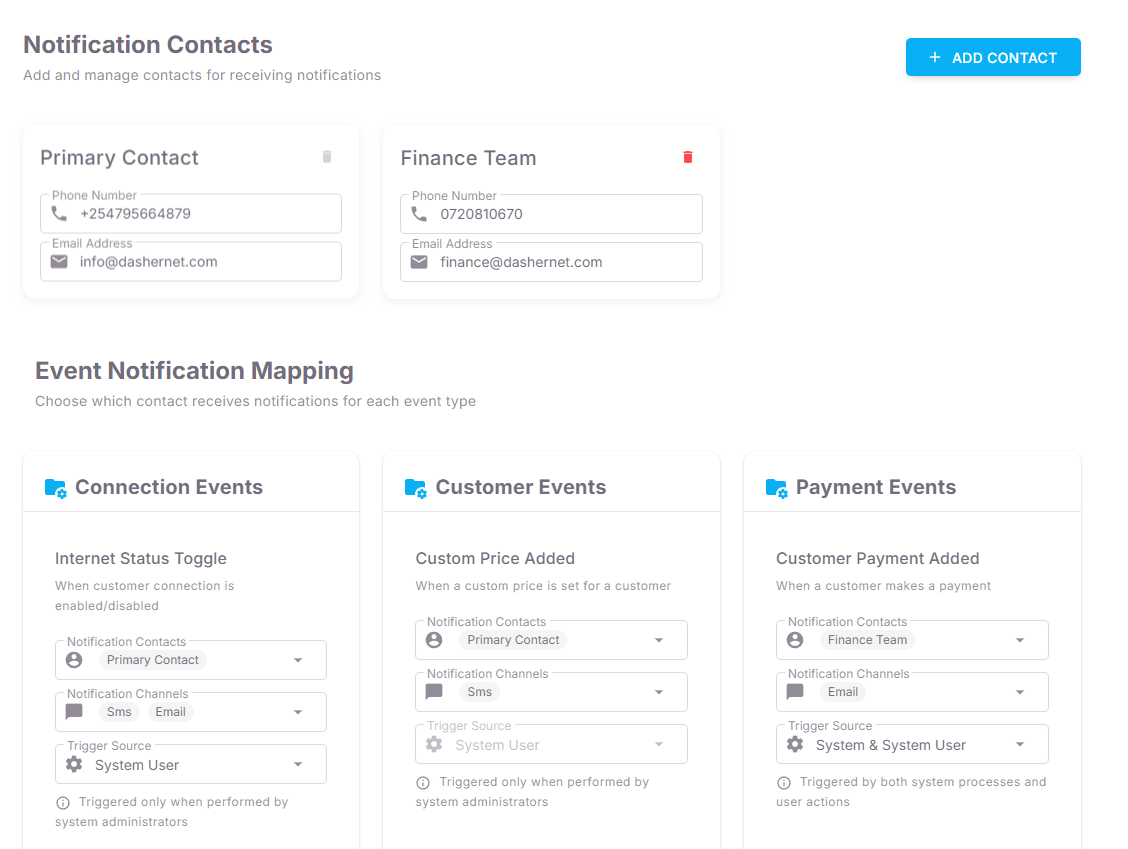
🔔 How Event Notifications Work
Notifications in Dashernet are now fully configurable per event type. Each event can define:
-
Notification Contacts
Assign specific people or groups (e.g., Primary Contact, Finance Team, Technical Staff) to receive event alerts. Multiple contacts can be added for redundancy and wider coverage. -
Notification Channels
Choose how alerts are delivered — SMS, Email, or both — based on urgency and importance. For example, critical system failures can go through both SMS and email, while less urgent updates may only use email. -
Trigger Source
Define whether an event is triggered by:- System (automated processes like backups, router checks, or payment reconciliations)
- System User (actions performed by administrators or staff)
- System & System User (events that can be triggered by both automation and user actions)
-
Trigger Conditions
Some events only trigger when executed manually by system administrators, while others are fully automated.
📂 Event Categories
Notifications are grouped into four main categories for clarity and easier management:
-
Connection Events
- Internet Status Toggle – Alerts when a customer’s connection is enabled or disabled.
- Disconnection Exemption – Alerts when a customer is granted exemption from disconnection.
-
Customer Events
- Custom Price Added – Notifies when a custom price is set for a customer.
- Discount Added – Alerts when a discount is applied to a customer account.
-
Payment Events
- Customer Payment Added – Triggers when a customer makes a payment, ensuring financial updates reach the right team.
- Unresolved Payment Added – Alerts when a payment is made to an unknown or mismatched account.
-
System Events
- Low SMS Credit Alert – Warns when available SMS credits drop below a configured threshold.
- Router Offline Alert – Notifies when a router goes offline, allowing faster response to outages.
- Backup Failure – Triggers when scheduled system backups fail, ensuring administrators can take immediate corrective action.
This system ensures that critical events reach the right people instantly while reducing unnecessary noise.
✨ Improvements
Internet Plans Details Page
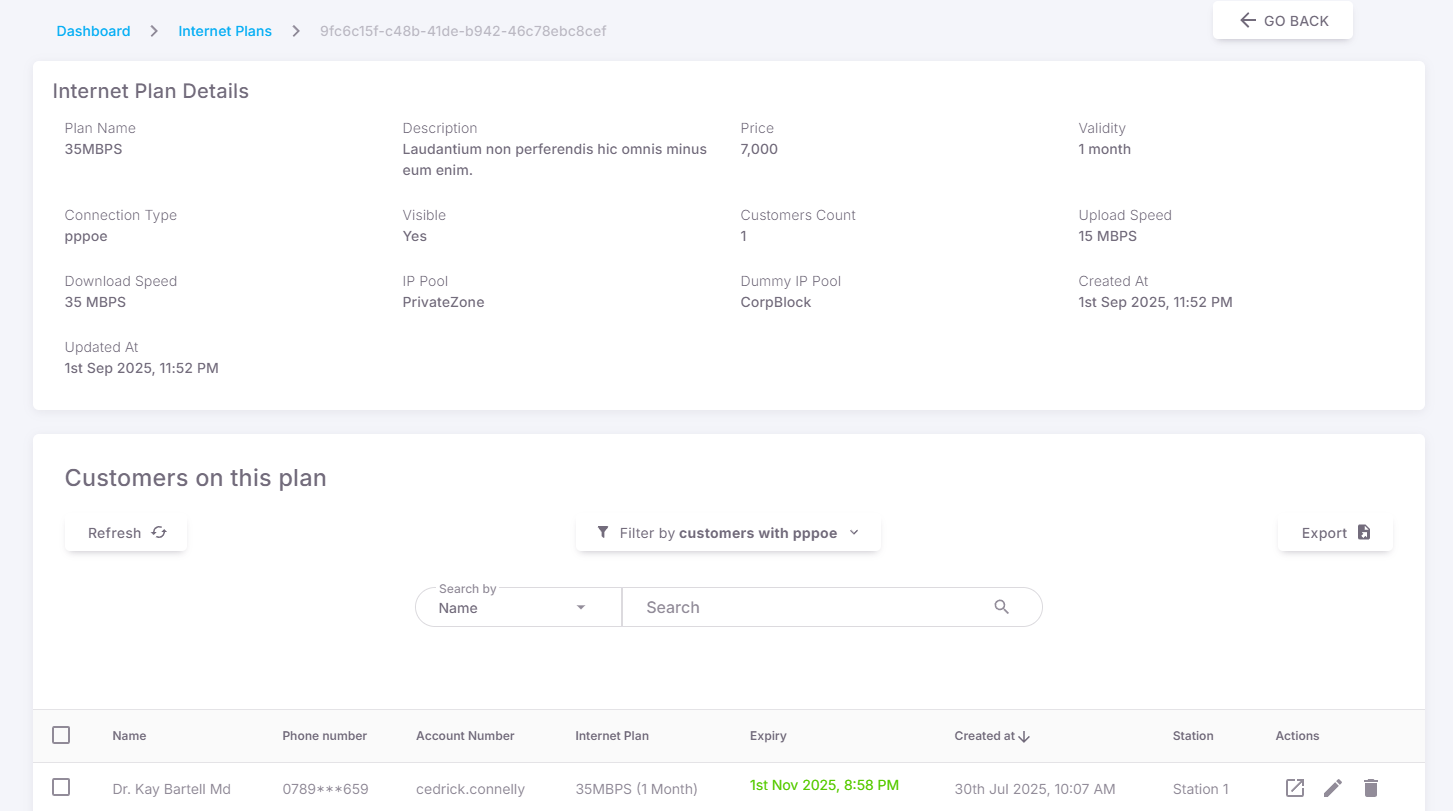
Enhanced internet plan management with a comprehensive details view:
- Detailed Plan Information: View complete internet plan specifications, pricing, and configuration details in one centralized location.
- Customer Subscription Overview: See a complete list of customers currently subscribed to each internet plan.
- Subscription Analytics: Monitor plan popularity and customer distribution across your internet service offerings.
This improvement streamlines plan management and provides valuable insights into customer subscription patterns.
Customer Filtering by Internet Plan (SMS)
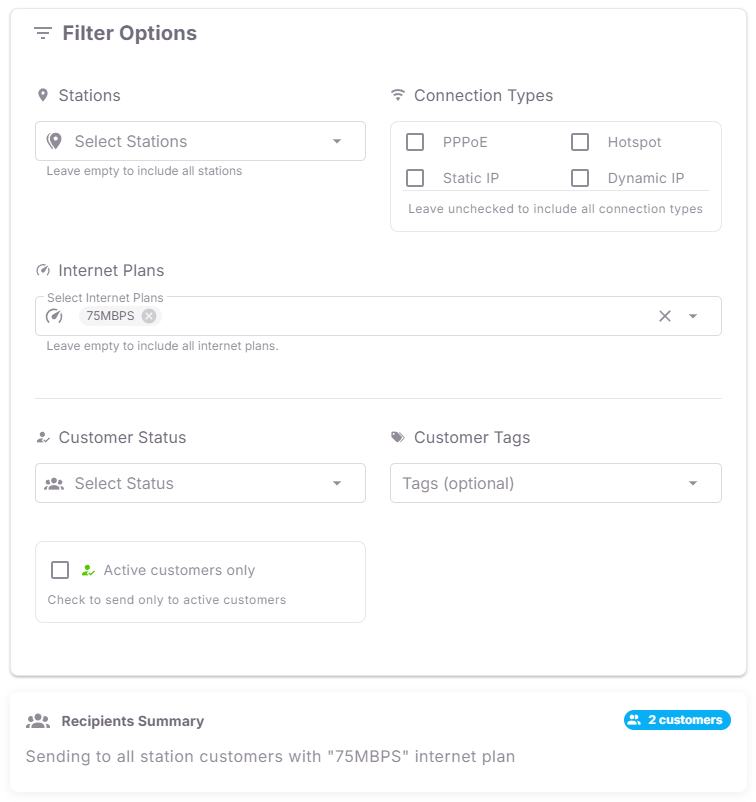
Improved SMS communication capabilities with intelligent filtering. Instead of repeating similar options across multiple steps, the new system centralizes filtering:
- Plan-Based Targeting: Filter and target customers based on their internet plan subscriptions.
- Bulk Communication: Send targeted messages to all customers on a selected plan in a single action.
- Segmented Messaging: Deliver personalized communication by narrowing recipients to specific segments within a plan.
This reduces redundancy, making filtering faster, cleaner, and more efficient, while still giving you granular targeting control.
🔧 Technical Improvements
- Improved mobile responsiveness across all new features
Important Update Information
Automatic Updates
This update will be applied automatically to your Dashernet system. The notification configuration will be set to default settings initially — you can customize these through the new Event Notification Settings panel.
Getting Started
-
Event Notification Settings
- Navigate to:
Settings > System Settings > Event Notification. - Use this section to configure and manage how event notifications are sent to users.
- Navigate to:
-
Internet Plans – Details View
- Go to the Internet Plans page.
- Click on any specific plan to open its new details view, where you can see richer plan information and options.
-
Enhanced SMS Filtering
- When sending communications to customers, try the improved SMS filtering feature.
- This helps ensure your messages are better targeted
This release focuses on improving operational efficiency and customer communication capabilities. Thank you for your continued feedback that helps make Dashernet better!